If you specified an On Demand policy, you must create recovery nodes manually. This process can take 20 minutes to several hours depending on the size of the recovery node. onQ uses the recent backup to create the recovery node.
|
1.
|
Log on to the HA Appliance’s onQ Portal.
|
|
2.
|
|
3.
|
The amount of space required appears in the Space Required column. The RN Space Available is shown just above the Unlock button.
|
4.
|
Click on the recovery node name, then Build the Recovery Node.
|
If you don’t have enough disk space, onQ states that there’s insufficient disk space. Go to Delete on‑demand RNs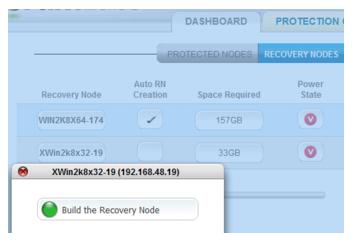 .
.