Security and Communications : Secure HA connection to PNs

Secure HA connection to PNs
The network connection between the HA Appliance and the PN is generally over a trusted LAN. In some cases, though, it might be desirable to provide strong authentication between the HA Appliance and the PN.
The onQ Appliance uses an X.509 certificate for security. Your onQ Appliance ships with a unique certificate already installed. However, you can create and install a new certificate at any time.
During initial setup of your onQ Appliance, it’s a best practice to create a new certificate. Otherwise, there’s no reason to create and install a new certificate. The certificate has a long expiration.
To generate a certificate:
1.
Log on to the HA Appliance’s onQ Portal.
2.
Go to APPLIANCE CONFIG tab > ADVANCED button > SECURITY page.
3.
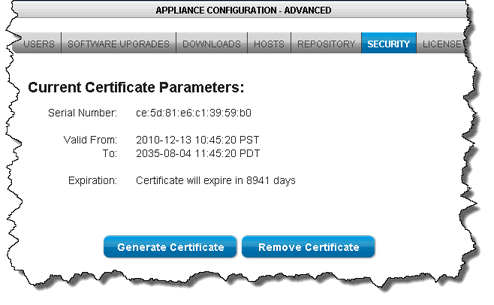
Click Remove Certificate, then Yes to remove the existing certificate on the onQ Appliance. An example certificate is as follows:
4.
Click Generate Certficate.
Don’t start protection yet. If you start protection your protected nodes indicate that they have an unsecure connection (see Monitor protected nodes), and this is expected behavior.
5.
To manually install the certificate:
onQ automatically installs the certificate that you generate when you enroll protected nodes and again when you upgrade them. However, you can manually install them, if you desire.
1.
Log on to the HA Appliance’s onQ Portal.
2.
3.
From that PN, launch the HA Appliance’s onQ Portal.
4.
Go to PROTECTION CONFIG tab, then click on the Update PN Security button.
5.
Click Yes to download the file to the protected node. Your browser saves the file to its default location.
6.
Move the onQApplianceName.cert file to C:\Program Files\Quorum\QuorumDCRM-NODE\security\.
7.
8.

v3.6 HF1
v3.6 HF1