Protection : Delete on‑demand RNs

Delete on‑demand RNs
Each RN uses nearly the same amount of disk space on the onQ Appliance as is used on the PN.
Assuming you’re using the on‑demand policy, if there is not enough disk space on the onQ Appliance for an RN that you want to build, you must remove one or more existing on‑demand RNs. (You cannot add disk space at this time without reinstalling.)
Deleting the RN does not affect the corresponding PN.
To remove a recovery node:
1.
Log on to the HA Appliance’s onQ Portal.
2.
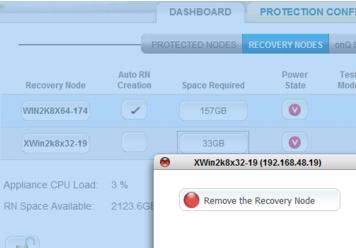
Go to DASHBOARD tab > RECOVERY NODES page.
3.
Click on the Space Required button for the recovery node that you want to delete.
4.
Click Remove the Recovery Node.

v3.6 HF2
v3.6 HF2