Incremental updates between the HA Appliance and DR Appliance are extremely efficient due to the deduplication and compression techniques employed by onQ. The initial “seeding” of the DR repository, though, typically requires that the entire (deduplicated, compressed) images of all PNs be transferred from the HA Appliance to the DR Appliance. This can be done in one of the following ways:
|
•
|
LAN Synchronization: This is the fastest way. Place the DR Appliance on the LAN with the HA Appliance until they are synchronized, then relocate the DR Appliance to the secondary site. You know the appliances are synchronized when the timestamps for the Last Update Time match. (see Monitor DR Appliance). This method is simple and fast, but it is not always practical due to geographical or other logistical considerations. DR Appliance might need to be reconfigured if its IP configuration needs to be changed for installation at the remote site.
|
|
•
|
WAN Synchronization: While this is the simplest way, and allows you to initialize your installation with the Appliances in their final locations, it might not be practical depending on the ratio of WAN speed to the size of the repository. The table below shows estimates of synchronization times for various data volumes and WAN bandwidth allocations (onQ allows you to throttle the amount of WAN bandwidth used). These calculations estimate 15% deduplication/exclusion savings on the base image and a 2.5 compression ratio.
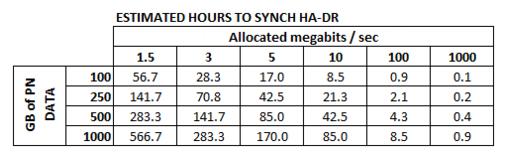 |
|
•
|
Export/Import using External Drive: Export the HA repository to portable storage and then import it to the DR repository, if you have too much data for a LAN or WAN synchronization.
|