Backup and Restore : Adjust bandwidth throttling

Adjust bandwidth throttling
Bandwidth throttling on the WAN connection between the HA Appliance and the DR Appliance is set by default to the maximum bandwidth available. If you have a DR Mirror, you can also adjust bandwidth throttling between the DR Appliance and the DR Mirror.
Bandwidth throttling can prevent a single transfer operation from swamping the network, node crashes, or other processing bottlenecks. You might need to adjust bandwidth throttling downward if the replication process places too much of a burden on your network.
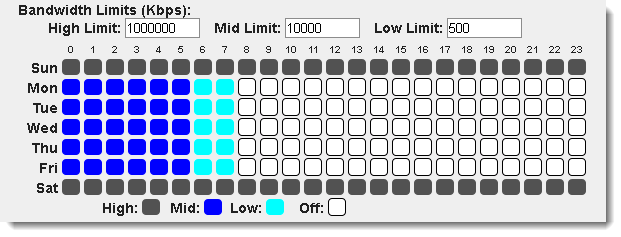
The onQ Portal enables you to create daily schedules that adjust the bandwidth to allow high utilization during non-working hours and low utilization during working hours:
To adjust bandwidth throttling between HA Appliance and DR Appliance:
1.
Log on to either the HA Appliance’s onQ Portal.
2.
Go to APPLIANCE CONFIG tab > onQ (REMOTE) page, then MODIFY.
3.
Change the value (Kbps) in the High Limit, Mid Limit, and Low Limit fields.
4.
To adjust bandwidth throttling between DR Appliance and DR Mirror:
1.
Log on to either the DR Appliance’s onQ Portal.
2.
Go to APPLIANCE CONFIG tab > onQ (REMOTE) page, then MODIFY.
3.
Change the value (Kbps) in the High Limit, Mid Limit, and Low Limit fields.
4.

v3.6 SP1
v3.6 SP1