Protection : Modify recovery node creation policy

Modify recovery node creation policy
onQ can create recovery nodes either automatically with each backup cycle or on-demand when requested.
Recovery nodes can be configured to be built in two ways:
•
Ready-to-Run - the RN is updated after each backup cycle
•
On Demand - the RN is only built when requested through the onQ Portal
Build-on-Demand mode is typically used to conserve onQ Appliance resources by creating RNs less frequently and only as they are needed.
To switch policies: (RECOVERY NODES page)
1.
Log on to the HA Appliance’s onQ Portal.
2.
Go to DASHBOARD tab > RECOVERY NODES page.
3.
4.
•
(All RNs) Click either the ALL BoD or ALL AUTO button at the bottom of the page, then click Disable RN Auto Creation/Enable RN Auto Creation to switch all RNs to a given policy.
•
(Single RN) Click the Auto RN Creation button next to the RN, then click Disable RN Auto Creation/Enable RN Auto Creation to switch to the other policy.
The acronym BoD (Build on Demand) appears next to the icon if Auto RN Creation is set to disabled.
To switch policies: (PROTECTION CONFIG tab)
1.
Log on to the HA Appliance’s onQ Portal.
2.
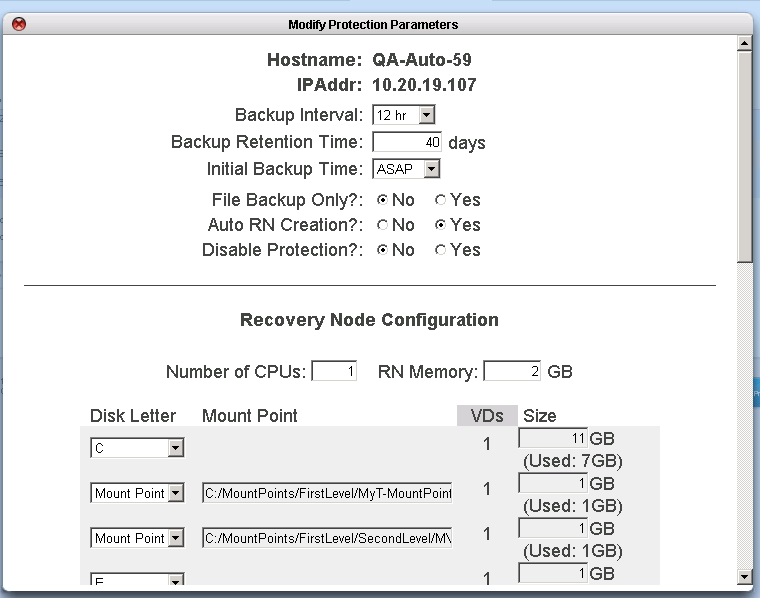
From the PROTECTION CONIG tab, select the PN you want to modify, then click MODIFY.
3.
•
•
When RN Auto Creation is set to No, the RN must be built manually. This can take anywhere from a few minutes to several hours, depending on size. There must be enough disk space on the onQ Appliance to accommodate the RN.

v3.6 SP1 HF1
v3.6 SP1 HF1