|
•
|
In the case of an agent‑less PN enrollment, if you need to rename your onQ, do one of the following:
|
•
|
If you have only one PN: (1) From the onQ Portal, delete the PN, choosing to retain ...the associated data from the repository and corresponding RN.... (2) Rename the onQ. (3) Re‑enroll the PN, then activate as outlined in Step 8 of (Agent‑less Linux/Windows PNs) Enroll protected nodes.
|
|
•
|
If you have multiple PNs: (1) Rename the onQ; (2) On each ESXi/ESX server, delete from disk all PN proxies that use the old onQ host name. (3) Reinstall the PN proxies using the PN enrollment process as outlined in (Agent‑less Linux/Windows PNs) Enroll protected nodes, selecting the Reinstall check box instead of the individual PN check boxes, which are greyed out because they are already enrolled.
|
|
1.
|
Log on to the onQ Appliance’s onQ Portal.
|
|
2.
|
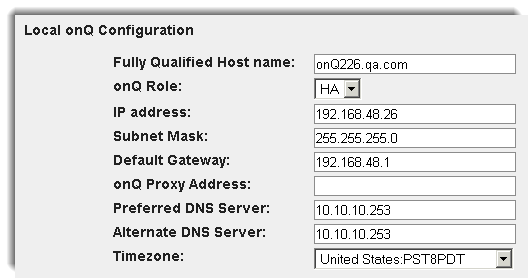
|
3.
|
Click REVERT to return the fields to their initial values, or click the cancel icon (at the upper left) to discard your changes and return to the previous page.