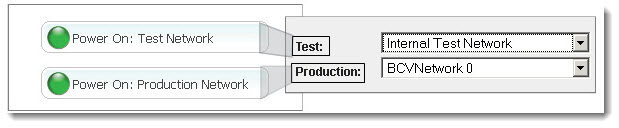
Your supported Windows RNs (see Platform Support) can run in either production mode or test mode on multiple networks using virtual NICs. An RN’s IP address changes during an RN build to accommodate these different networks.
When an RN starts in production mode or test mode, it will connect to the pre‑configured network. If you do not configure for multiple networks, the RN connects to the BCV Network 0 (default) or Internal Test Network respectively; if you have PNs on different subnets, they will not have a pathway outside the onQ Appliance.
Your RNs can also be assigned to virtual networks, but you must set up these virtual networks in advance as outlined in Create Custom Networks for RNs.
If you want to attach an RN directly to a physical NIC, you do not need to create a custom network. Simply choose either the existing BCVNetwork 0 virtual network or one of the Pool‑wide virtual networks that is associated with ethX: 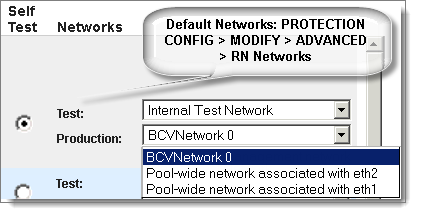
|
1.
|
Log on to the onQ Appliance’s onQ Portal.
|
|
2.
|
Click the PROTECTION CONFIG tab.
|
|
3.
|
|
4.
|
|
•
|
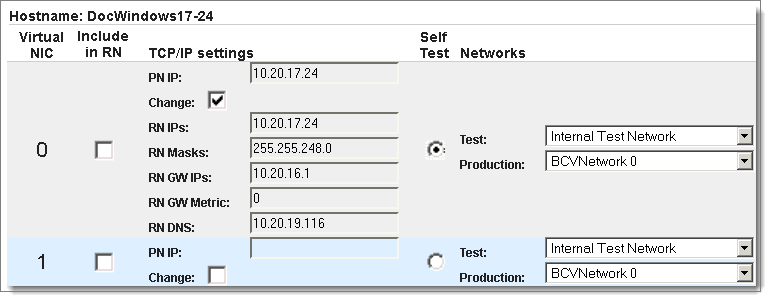
Virtual NIC. Define your virtual NICs. The hypervisor supports up to 7 virtual NICs (NIC 0-6). NIC 0 defaults to the PN’s pre‑configured TCP/IP settings. Use the Include in RN check box to make them available to the RN.
|
|
•
|
Include in RN. Select the check box for each Virtual NIC that you want to make available to the RN.
|
|
•
|
TCP/IP settings. Specify the networking information for each Virtual NIC that you want to make available to the RN. You can set different IPs for the HA and DR, enabling RNs to boot up with different IPs per location. RN Gateway metric is a 32-bit integer; the chosen route will be the gateway with the lowest metric.
|
|
•
|
Self Test. Select the Self Test radio button that corresponds to Virtual NIC and TCP/IP settings that you want the onQ to use for all Self Tests.
|
|
•
|
Networks. Select the test network and production network that you want onQ to use when running an RN in either mode. Networks include:
|
|
Virtual adaptor for running RN in test mode and for running RN self-tests. Do not use as a production network.
|
|