onQ performs an initial backup of your PN when you first start protection on your nodes. For all subsequent backups, you can instruct onQ when and how often to perform those backups. Each protected node has its own backup schedule with backups to occur at varying times, days of the week, and frequencies. Such granular scheduling is essential for those networks with low bandwidth.
|
1.
|
Log on to the HA Appliance’s onQ Portal.
|
|
2.
|
|
3.
|
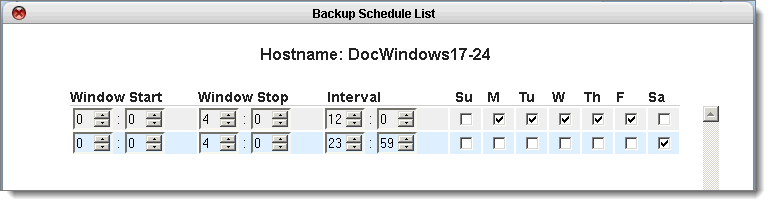
Window Start: Based on a 24‑hr clock, select the time of day to start the backup. Choose a time when the network is the least busy. The initial backup can take a considerable amount of time. Subsequent backups record only changes that have occurred since the preceding backup and so will be relatively brief.
Window Stop: Based on a 24‑hr clock, select the time of day to stop the initiation of new backups. Any backups currently running at the time of the stop period will be allowed to complete. As outlined in Stop in‑progress backups, you can stop these backups.
Interval. The interval (in minutes/hours) between the start of the data backup and the next data backup. Basically, the interval represents the frequency of backups. Valid values: hour, 0-23; minute, 0-59. As with any backup solution, this interval represents your potential data loss in the event of a failure (aka RPO).The shortest interval is 15 minutes, which is impractical for an onQ that’s protecting a large number of PNs, possibly resulting in queued backups as outlined in Stop in‑progress backups. If you are not sure what interval to specify, a 4‑hr interval is common in enterprises with high network bandwidth and 24-hr interval in low network bandwidth.
Days: Select the check box for the day(s) of the week for which you’d like this policy to apply. If you don’t have business activity (for example, Sunday) on a given day, clear that check box.
|
5.
|
(Optional) Monitor these backups. Go to Monitor protected nodes and Monitor backups. If you receive any email alerts, follow the instructions in Backup Alerts.
|