|
•
|
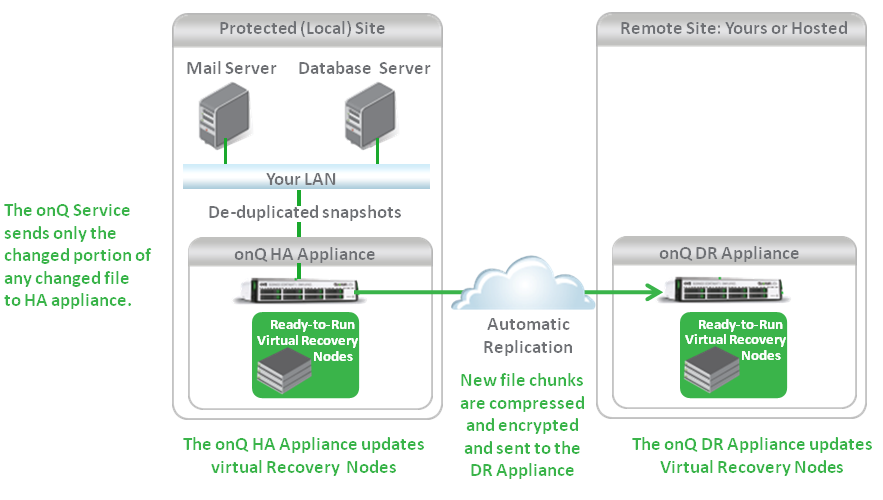
onQ is a fully integrated turnkey Appliance solution. One onQ Appliance is deployed for high‑availability (HA) protection. Most businesses add a second onQ Appliance at another location for disaster recovery (DR) or use Quorum’s hybrid cloud offering to host their DR.
|
|
•
|
Each onQ Appliance hosts the onQ Manager, Quorum’s core software.
|
|
•
|
(agent‑based PNs) onQ Service software is installed on each protected node (PN). The onQ Manager communicates with this software to determine operational status and to schedule snapshots. For more information go to (Agent‑based PNs) Restart the onQ Service and (Agent‑based Linux PNs) Enroll protected nodes.
|
|
•
|
(agent‑less PNs) Proxy hosts are installed on the ESX/ESXi host. The onQ Manager communicates with these proxy hosts to determine operational status and to schedule snapshots. For more information, go to (Agent‑less Linux/Windows PNs) Enroll protected nodes.
|
|
•
|
You manage onQ Manager through an intuitive, browser‑based, user interface called the onQ Portal. When you install your onQ Appliance(s), you use the UI to configure the onQ Appliance to take incremental snapshots for each protected node. You also use the UI to control and monitor the protection process.
|
|
•
|
Once protection is started, the HA Appliance manages your backup schedule, taking deduplicated, incremental snapshots of your protected nodes at specified intervals.
|
|
•
|