The Basics : Configure Appliance’s hypervisor settings

Configure Appliance’s hypervisor settings
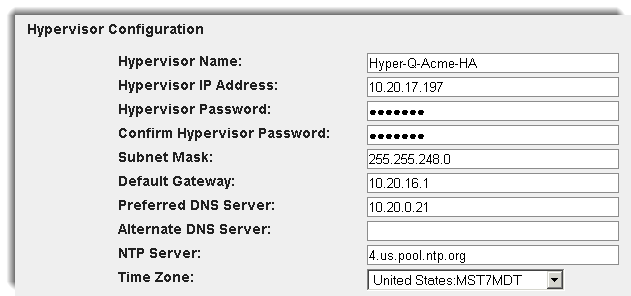
You can configure a variety of settings related to this onQ Appliance’s hypervisor, including:
•
•
•
•
•
•
•
•
•
NTP Server (default is 0.us.pool.ntp.org)
•
•
 
To configure an onQ Appliance’s hypervisor settings:
Your onQ Appliance’s hypervisor is XenServer. The onQ Appliance ships with the hypervisor information pre‑configured.
The hypervisor name is based on a Quorum naming convention: Hyper-Q-CustomerName-ApplianceType. This naming convention provides you the best customer support possible because it communicates the onQ Appliance’s role and your topology.
Quorum recommends that you retain the pre‑configured hypervisor name; however, Quorum recognizes that your company might have its own naming conventions. Before you change the hypervisor’s name, contact Quorum Support with your naming convention requirements so that we can rename the hypervisor. without losing sight of the relationships between onQ Appliances.
1.
Log on to the onQ Appliance’s onQ Portal. You must log on as varadmin user.
2.
Click the APPLIANCE CONFIG tab > HYPERVISOR page > MODIFY button.
The Modify Hypervisor Config page appears.
 
3.
Click REVERT to return the fields to their initial values, or click the cancel icon (at the upper left) to discard your changes and return to the previous page.

4.

v3.8 SP1 HF1
v3.8 SP1 HF1