Disaster Recovery and DR Preparedness : Cancel or override RN startup process

Cancel or override RN startup process
During the startup process for an RN configured with dependencies, onQ might be waiting for a dependency to become available or for the delay period.
If you are waiting for a dependent RN/server that has no chance of coming online and/or you never specified a timeout, you might need to force or cancel the startup process.
To cancel or override the process:
1.
Log on to the onQ Appliance’s onQ Portal.
2.
Go to DASHBOARD tab > RECOVERY NODES page.
3.
4.
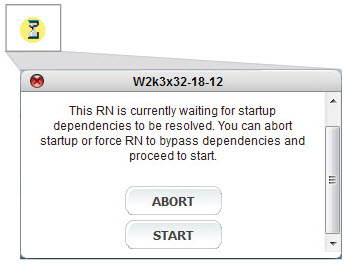
Click the button in the Power State column, then click:
•
ABORT - to cancel the startup process. Fix the dependency problem, then restart.
•
START - to override the dependencies and start the RN. Fix the dependency problem.
v3.8 SP1 HF1
v3.8 SP1 HF1