These procedures outline the steps to recover an Oracle database with ARCHIVELOG mode enabled and the Oracle VSS Writer service installed. Hot backups are not possible with an Oracle database using NOARCHIVELOG mode. Databases using NOARCHIVELOG mode must be put in a consistent (shutdown) state in order to perform a backup.
|
2.
|
|
3.
|
From the onQ Portal’s Protection Config tab, verify that you have the following volumes protected.
|
|
4.
|
The Oracle VSS Writer service is installed by default with Oracle Database 11g. Oracle Database 10g releases require a manual installation of the Oracle VSS Writer service. The installation instructions for the Oracle VSS Writer service can be found here.
|
a.
|
Make sure Oracle is in ARCHIVELOG mode.
|
|
b.
|
Configure Oracle VSS Writer service with the SYSDBA user, mode Automatic; then, test that the user account has SYSDBA set correctly:
|
|
> sqlplus sysadm_amy as SYSDBA
|
|
c.
|
|
d.
|
|
1.
|
|
> oravssw /q /status
|
|
2.
|
|
> vssadmin list writers
State: [1] Stable
|
|
3.
|
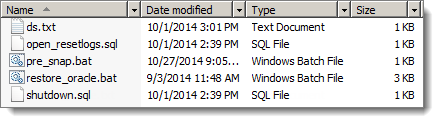
On the PN, unzip the Quorum Oracle database recovery scripts in the C:\Program Files\Quorum\usr folder.
|
|
4.
|
|
a.
|
Make a backup copy of the restore_oracle.bat batch file.
|
|
> set DB_INSTANCES=(orcl oracl1 oracl2)
|
|
5.
|
Initiate a backup of the PN, or wait for a scheduled backup to complete.
|
|
8.
|
Check the PN’s Event Log for VSS‑related errors. If there are errors, resolve them. For troubleshooting information, see the appropriate return code in A0801.
|
This procedure uses Quorum’s restore_oracle.bat scripts. This solution is recommended.
|
1.
|
With the RN, in test or production mode, navigate to the C:\Program Files\Quorum\usr folder, then run the restore_oracle.bat file completely.
|
You will be prompted for your database password twice for each database instance: once for a shutdown command and once for an open resetlogs command.
|
•
|
|
•
|
This procedure uses a manual process to restore your database(s). This solution is not automated as is the case with using Quorum’s restore_oracle.bat scripts, which executes the same commands in the following manual process.
|
> sqlplus SYS as SYSDBA
SQL> SHUTDOWN IMMEDIATE;
SQL> EXIT;
|
|
> set ORACLE_SID=orcl
> sqlplus SYS as SYSDBA
SQL> SHUTDOWN IMMEDIATE;
SQL> EXIT;
|
|
> qvss.exe restore
|
|
> sqlplus SYS as SYSDBA
SQL> ALTER DATABASE open resetlogs;
SQL> EXIT;
|
|
4.
|
Where testtable is the table_name and where orcl is the database_instance_name or Oracle System ID (SID).
|
> sqlplus system@orcl
SQL> select count (*) from testtable;
|
|
5.
|
Check the PN’s Event Log for VSS‑related errors. If there are errors, resolve them. For troubleshooting information, see the appropriate return code in A0801.
|
|
•
|
|
•
|
If you attempted to restore an Oracle database either manually or using restore_oracle.bat and your database(s) fails to open, you have an incomplete database recovery. This procedure includes two ways to fix an incomplete database recovery. Begin with the recommended solution.
This solution uses Oracle’s recover database until cancel recovery method to fix an incomplete database recovery. This procedure is the easiest way to fix such a problem, and is recommended before attempting any other incomplete database recovery method.
|
1.
|
Restart a fresh RN, in test or production mode. If you’re using restore_oracle.bat, execute that file now, but choose not to start the databases at the end of batch file.
|
|
2.
|
|
C:\> SET ORACLE_SID=ORCL
|
|
C:\> SQLPLUS / AS SYSDBA
|
|
4.
|
Perform the following Oracle DB incomplete recovery procedure, which uses the recover database until cancel method:
|
|
a.
|
Execute the recover database until cancel method.
|
|
SQL> RECOVER DATABASE UNTIL CANCEL USING BACKUP CONTROLFILE;
|
|
SQL> alter database open resetlogs;
|
|
SQL> SELECT CURRENT_SCN FROM V$DATABASE;
|
If the database fails to open successfully, the cause is a known bug (race condition) in Oracle’s VSS Writer. Perform the procedure outlined in Using point‑in‑time recovery method.
This solution uses Oracle’s point‑in‑time recovery method to restore the database to the target time (or SCN) for recovery. This procedure is guaranteed to succeed, but is more complicated; for this reason, use it as a last resort. Perform the following procedure for each database instance.
|
1.
|
Restart a fresh RN, in test or production mode. If you’re using restore_oracle.bat, execute that file now, but choose not to start the databases at the end of batch file.
|
|
2.
|
|
C:\> SET ORACLE_SID=ORCL
|
|
C:\> SQLPLUS / AS SYSDBA
|
|
4.
|
Perform the following Oracle DB incomplete recovery procedure, which uses the point‑in‑time recovery method.
|
|
a.
|
Determine the missing last change number and record the last NEXT_CHANGE# value:
|
|
SQL> SELECT MAX(NEXT_CHANGE#) FROM V$LOG_HISTORY;
|
|
b.
|
Recover to the last change number in the last archived redo log on the RN. This value is the last NEXT_CHANGE# value (see Step 4) minus 1. Where the last change value is 118009, therefore, the value is 118008 (118009 -1).
|
|
SQL> RECOVER DATABASE UNTIL CHANGE 118008 USING BACKUP CONTROLFILE;
|
|
SQL> alter database open resetlogs;
|
|
6.
|
|
SQL> SELECT CURRENT_SCN FROM V$DATABASE;
|