Backup and Restore : Retrieve objects from Repository : Perform WSR Restore

Perform WSR Restore
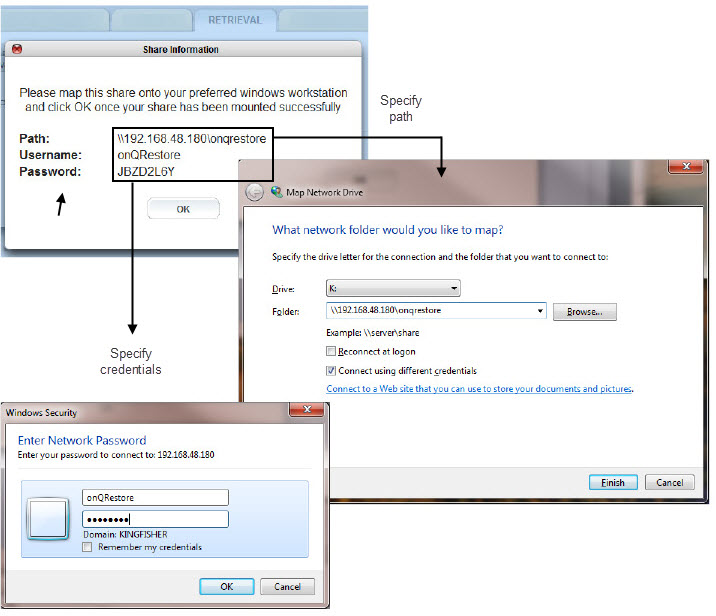
A Windows Share Restore (WSR) restore involves mapping from a drive on a Windows server/client to a shared location generated by the onQ. This shared location will contain all the snapshots for a given PN.
For security purposes, you can only mount the share from one location; besides, one share is recommended because browsing the repository can be resource intensive.
After you create the share, you can browse any of the snapshots (backups) listed for viewing, reading, and copying any folders/files as needed. However, a few things to note:
•
•
•
To restore Exchange Server data and mailboxes, consider using Kroll’s Ontrack PowerControls.
To retrieve a snapshot, using WSR:
1.
Log on to the Appliance’s onQ Portal.
2.
Click on the RESTORE tab > WINDOWS SHARE page. onQ displays an empty page if no share was activated.
3.
a.
Click on the ACTIVATE SHARE button.
b.
When a protected node appears in the list, that PN has data in the Repository, including any unprotected nodes that were previously protected.
c.
The share expires after 30 minutes of no activity. Also, if the share is not mapped on to a Windows server/client before you exit the popup, both Client and Connection Start Time values are blank.
4.
5.
To delete a share:
You might want to delete share if you:
•
•
1.
Log on to the Appliance’s onQ Portal.
2.
Click on the RESTORE tab > WINDOWS SHARE page.
3.
4.
 

v3.8 SP1
v3.8 SP1